Texturing your climbing holds
How to Texture your 5 Tendons climbing holds
There are a few methods to add texture to your 5 Tendons climbing holds. These techniques are also fine to use on any 3D printed hold.
Base Coat:
This is a good place to start with any texture option you choose below. First give the plastic a light sand to scuff out the shiny surface to help bonding. Mix up a small portion of resin and mix with 30% sand. You can add acrylic paint at this stage if you like. This is good for doing dual texure holds.
Paint on with a cheap paint brush.
Once base coat is dry, give a light sand with 80/120 grit to take off any sharp points. Foot holds can be left unsanded.
Note: You can skip base coat when using Aluminium Oxide to make super smooth yet grippy holds.
Final Coat Options:
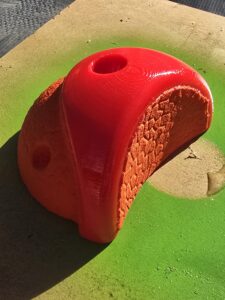
- Course friction (best for feet): Spray with clear acrylic and sprinkle with dry, seived sand or Garnet Sand Blasting Shot
- Fine friction (best for hands): Spray with clear acrilyc and sprinkle with 80 (courser), 120 or 180 (finest) grit Aluminium Oxide Powder
- Then finish with coloured or clear acrylic spray paint. When spraying lightly wet the grit. If you wet it too much just sprinkle more grit and spray again
- Leave for 24 hours then season the texture by rubbing with a piece of leather or denim
Note: You can add this sort of texturing to only certain parts of the hold if you want. Use tape to mask sections for cool dual texturing.
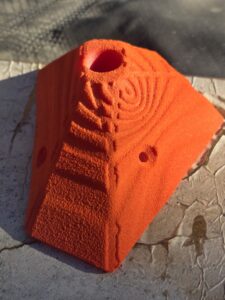
Add ‘Pre-texture’ using BumpMesh by CNC Kitchen
This is a really cool tool we use to print different textures right onto the hold. Then adding the usual Aluminium Oxide Paint finishing makes for a super creative way to mix it up!
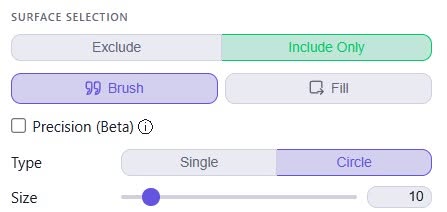
Simply visit https://bumpmesh.com/ and select ‘LOAD MODEL’. Select a 5 Tendons hold from your local drive.
Make sure you select the following options after selecting your chosen surface texture.
Also remember, never select ‘invert (push in instead of out)’ as this can make your mould leak if you make it too thin.